

Creating accessible e-learning isn’t just a compliance requirement—it’s a commitment to equity, inclusion, and great learning design. At L4 Learning Studio, we believe every learner deserves the opportunity to engage fully with training materials, regardless of their abilities, devices, or learning environments.
Accessibility is not an add‑on. It’s a design mindset. And the most widely recognised framework guiding this mindset is the Web Content Accessibility Guidelines (WCAG).
In this article we explain:
- What WCAG is and why it matters in e‑learning
- How accessibility improves learning outcomes
- Practical checklists you can use immediately
- How to align your e‑learning with WCAG A and AA standards
- References to the source materials used throughout
What Is WCAG and Why Does It Matter in E‑Learning?
WCAG — the Web Content Accessibility Guidelines — are internationally recognised standards developed by the World Wide Web Consortium (W3C) to ensure digital content is accessible to people with disabilities. (Referenced from Understanding WCAG: A Quickstart Guide for E‑Learning Developers.)
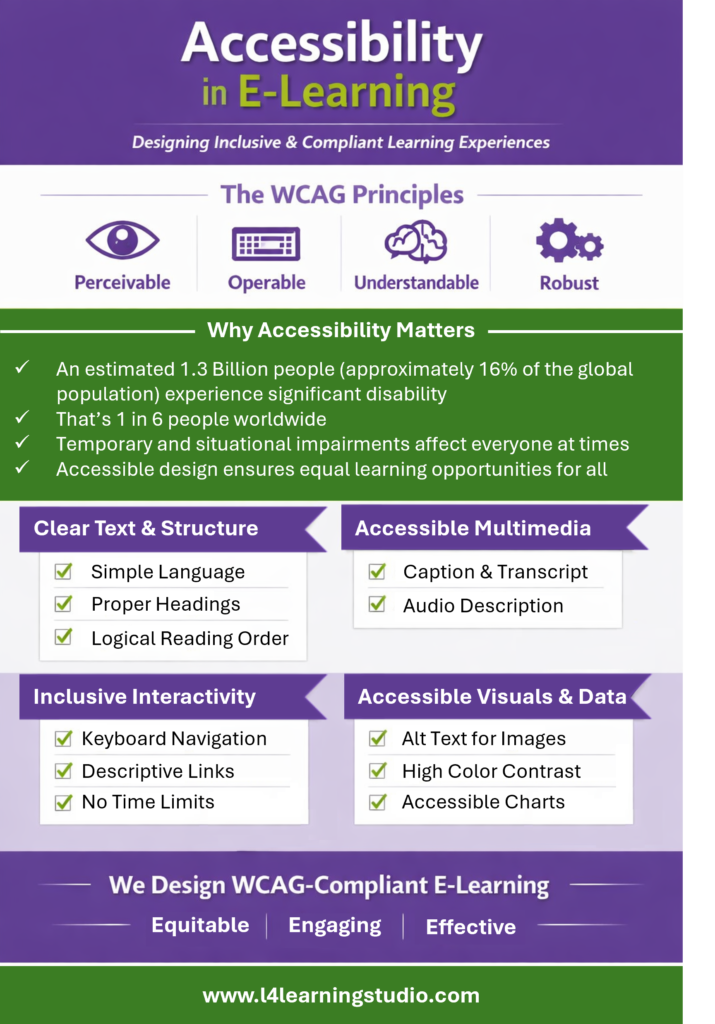
WCAG is built on four core principles. Accessible content must be: 1. Perceivable Learners must be able to perceive the information, regardless of sensory ability. Examples: alt text, captions, strong colour contrast. 2. Operable Learners must be able to navigate and interact with the course. Examples: keyboard navigation, logical focus order. 3. Understandable Content and navigation must be clear and predictable. Examples: plain language, consistent menus, clear instructions. 4. Robust Content must work with assistive technologies now and in the future. Examples: semantic structure, correct HTML tags, labelled user interface elements.Why this matters
According to the World, Health Organization, an estimated 1.3 billion people — about 16% of the global population — experience significant disability. That means 1 in 6 people worldwide live with some form of disability. Additionally, temporary and situational impairments affect everyone at times.
Accessible design ensures equal learning opportunities for all.
The Purpose of WCAG in E‑Learning
WCAG provides a clear, testable, internationally recognised standard for designing learning that is:
- Inclusive
- Legally compliant
- Compatible with assistive technologies
- Easier to navigate
- More usable for all learners
- Level A = essential, foundational requirements
- Level AA = recommended for most organisations; improves usability significantly
- Level AAA = advanced enhancements for specific needs
Most organisations aim for WCAG 2.1 Level AA, which balances feasibility with meaningful accessibility impact.
How to Apply WCAG principles into E-Learning
 Write Clearly
- Use plain, concise language
- Avoid jargon or explain it with a glossary
- Avoid ALL CAPS
- Use left‑aligned, sans‑serif fonts
- Maintain consistent heading hierarchy (H1 → H2 → H3)
Use Proper Semantic Structure
- Use true headings, lists, and tables — not manually formatted text
- Provide a table of contents for long documents
- Ensure reading order is logical
Captions & Transcripts
- Provide captions for all prerecorded video
- Provide transcripts for audio‑only content
- Avoid auto‑play
Audio Descriptions
- Add audio descriptions when visuals convey essential meaning
Avoid Harmful Visuals
- No flashing content that may trigger seizures
Alternative Text
- Provide meaningful alt text describing the purpose, not the appearance
- Avoid “image of…” or “picture of…”
Colour & Contrast
- Do not use colour alone to convey meaning
- Ensure contrast ratio of at least 4.5:1
- Test colours using a contrast analyser
Avoid Images of Text
- Use real text instead of text embedded in images
Keyboard Accessibility
- All interactions must be usable via keyboard
- Avoid hover‑only interactions
Logical Focus Order
- Ensure screen readers follow a predictable sequence (test this with the tabs key in the keyboard)
Descriptive Links
- Avoid “Click here” or “Read more”
- Use meaningful link text: “Download the safety checklist”
Clear Instructions
- Provide guidance wherever user input is required
Avoid Time Limits
- Unless they can be paused or extended
Tables
- Use simple tables with clear headers
- Avoid merged cells or complex spanning
Charts & Graphs
- Do not rely on colour alone
- Provide text descriptions or data tables
How L4 Learning Studio Helps You Meet WCAG Standards
At L4 Learning Studio, accessibility is built into every stage of our design process:
- Accessible storyboards and scripts
- WCAG‑aligned Articulate Storyline and Rise development
- Alt text, captions, transcripts, and keyboard‑friendly interactions
- Colour‑safe visual design
- Accessible PDFs, job aids, and documentation
- Hosting solutions for clients without an LMS
We help organisations meet WCAG 2.1 Level A and AA requirements while delivering beautiful, engaging learning experiences.
- How to Create Accessible E‑Learning (Checklist) — Articulate
- WCAG 2.1 Summary – Web Content Accessibility Guidelines (WCAG) 2.1